Saturday, June 25, 2011
Change the Default Path of Installation to your folder!

Our tip today will be "How to change path of the Default software installation".
Usually the default path is "C: \ Program Files".
The way to change the path as follows:
Usually the default path is "C: \ Program Files".
The way to change the path as follows:

Thursday, June 23, 2011
Improve performance by adding Virtual Memory

Sometimes RAM can't accommodate every size of the programs worked now, so the system will split the program code as a form of Pages and transfer the active pages (which is trying to implement).
the rest of Hard Disk in the allocated space is called Virtual Memory... And this is why slow of hard Drive significantly affect the speed of the device as a whole & you may encountering some messages like " windows virtual memory minimum too low "
the rest of Hard Disk in the allocated space is called Virtual Memory... And this is why slow of hard Drive significantly affect the speed of the device as a whole & you may encountering some messages like " windows virtual memory minimum too low "
Saturday, June 11, 2011
Temporarily disable "Restart Now" from Automatic updates

Automatic Updates in Windows XP is a great feature. Your computer will stay protected from threats, but when the Automatic Update complete it will pop up a window remind you every 5 minutes that you need to reboot the computer! This may be annoying if you are working.
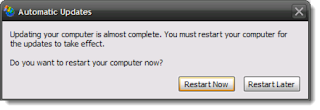
If you want to temporarily disable this message and delay rebooting just do the following:
Wednesday, June 8, 2011
Tip: On-Screen Keyboard, Windows XP
What do you do if the keyboard has been disrupted?.
Ok, there is a temporary solution which is called On-Screen Keyboard.
This tool of Windows XP displays a virtual keyboard on your computer screen that allows you to type Data & Characters using a pointing device ( mouse ) or joystick.
Friday, June 3, 2011
Hide the names of the images inside folders!

When you enter to a folder containing some images and display them as thumbnails appear under these images their names .
How you can hide these names and display just the images like the picture below?:
Sunday, May 29, 2011
Optimize Display Settings & speed Up the computer!

show all visual items in the windows XP may slow down the computer, so let's improve the performance of display.
Subscribe to:
Posts (Atom)