Tuesday, August 9, 2011
how to turn off firewall by one click in windows xp!

to avoid several stages of enable or disable the firewall.
Disable the Firewall of Windows XP:
1 - Click on Start
2 - Click on Run
3 - then type this command :
2 - Click on Run
3 - then type this command :
netsh firewall set opmode disable
4 - Then click on OK.
Enable the Firewall of Windows XP:
1 - Click on Start
2 - Click on Run
3 - then type this command :
2 - Click on Run
3 - then type this command :
netsh firewall set opmode enable

Wednesday, August 3, 2011
Tricks: Words become unreadable! Windows XP

This trick by Notepad to make some words unreadable!
Yes, really you can bilk your friends or any person !.
1 - First open the Notepad :
( Start > All programs > Accessories > Notepad ).
2 - Type this sentence :
dont eat the donut
3 - Now save the file:
( File > Save ) or ( CTRL+S) .
4 - Open the same file.
What do you notice?, the text becomes unreadable!
Enjoy this trick
Monday, August 1, 2011
How to know who spying on you in Windows XP?

Trick of this day is : How to know which software use your Internet connection, through the windows DOS to make sure there is no malware spying on you or something else.
1 - Click on Start.
2 - Click on Run.
3 - then type this command :
cmd
4 - Click on OK.
5 - In the DOS window type this command:
netstat -abnov
6 - Wait while the computer collect programs and DLLs that using your Internet connection.

7 - Now you can see all the programs that use your Internet connection in windows XP.
Other netstat commands
Netstat -p | Netstat –a |
Netstat –s | Netstat –b |
Netstat -v | Netstat -e |
Netstat –e -s | Netstat -n |
Netstat –s –p tcp udp | Netstat -o |
enjoy this trick!
Thursday, July 28, 2011
close 3 gaps on windows xp now!

Windows operating system still suffers from some gaps, Especially on the XP system, widely adopted.
These gaps can be exploited by hackers to access your computers!.
Come all to stand like a dam from this gaps and protect our Windows XP from the hack.
These gaps can be exploited by hackers to access your computers!.
Come all to stand like a dam from this gaps and protect our Windows XP from the hack.
First gap
Is one of the dangerous gates and spywares, To close them just do the following:
2 – go to File Types tab.
3 – Search for Windows Script Host Settings File.
4 – Click Delete.
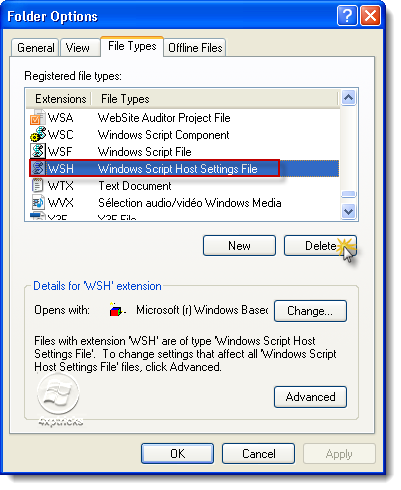
5 – The next windows click on Yes.
Second gap
It is (simple file sharing)
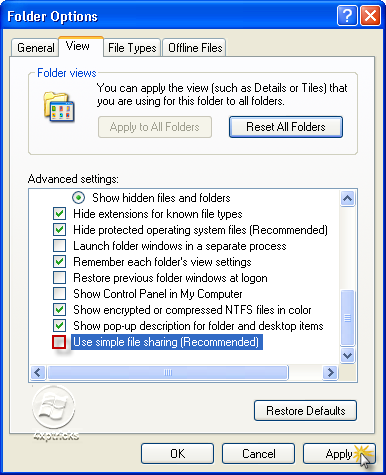
1 - Always stay on the same window, But this time we go to the View tab.
2 – Search for Use Simple File Sharing (Recommended).
3 – remove the tick , Then click Apply like the picture:
Third gap
1 - Start –> Control Panel –> Internet Options.2 – go to Advanced tab.
3 – Make a tick on Do net save encrypted pages to disk (see the picture).
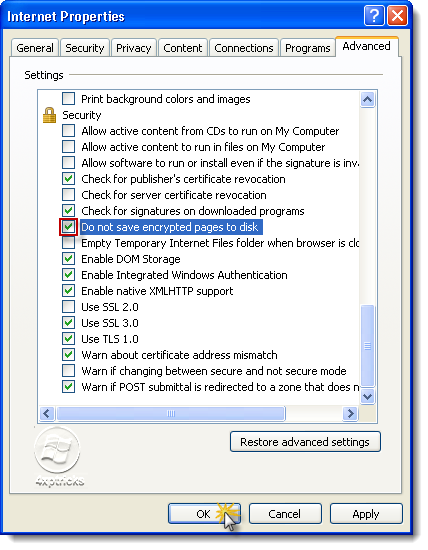
4 – Click OK.
Now we have closed the three gaps, which poses some danger to our devices!
Thanks for reading
Sunday, July 3, 2011
Some DLL files missed?, Use this tip!

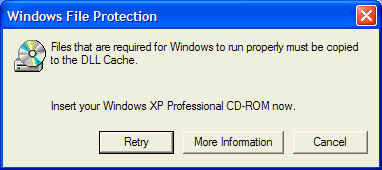
If you regularly encounter errors (such as warnings of missing DLL files or programs do not load) and you think that some part of Windows XP, you can check your system files to ensure that they are in good condition.
Foremost get Windows XP CD/DVD into the CD/DVD Drive
The Tip:
1 - Click on Start
2 - Click on Run
3 - then type this command :
2 - Click on Run
3 - then type this command :
sfc /scannow
Wait until the process is complete
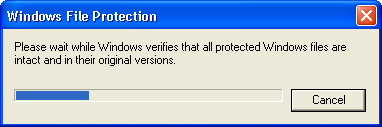
This will check all your Windows system files to see if they have been edited or changed.
If they have, it should be able to replace them with backups, but if it can not find them on your hard drive so it will be necessary to copy from your Windows XP CD or DVD.
If you have some problems with the tip I'm here!
Saturday, July 2, 2011
Add Copy To and Move To to right click!

Do you want to move your files to any folder by one click?, yeah! just one right click and your files transferred.
Let's do this from the Registry Editor.
Steps:
1 - Click on Start.
2 - Click on Run.
3 - then type this command to open the Registry Editor:
Let's do this from the Registry Editor.
Steps:
1 - Click on Start.
2 - Click on Run.
3 - then type this command to open the Registry Editor:
regedit
4 - click on OK.
5 - Then Follow the path in the Registry Editor:
HKEY_CLASSES_ROOT –> AllFilesystemObjects –> shellex –> ContextMenuHandlers |
New –> Key
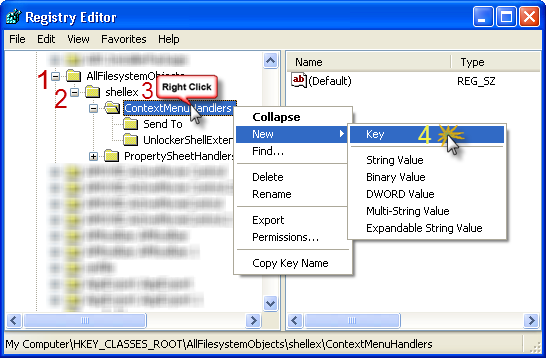
7 – Give it this name:
Copy To
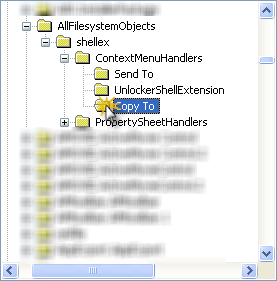
8 – Click on Copy to folder, in right side Double-Click on (Default)
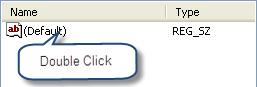
9 – Give it this Value:
{C2FBB630-2971-11d1-A18C-00C04FD75D13}
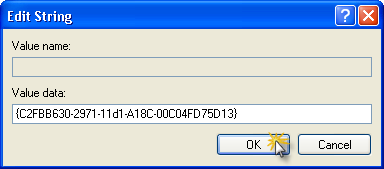
10 – Click OK.
Congratulations! Copy to have been added to your computer!.
-------------------------------------------------------------------------------------------------------------
We return to the same path (step 5), to add Move To option.
1 - Right-Click on ContextMenuHandlers folder then:
New –> Key
2– Give it this name:
Move To
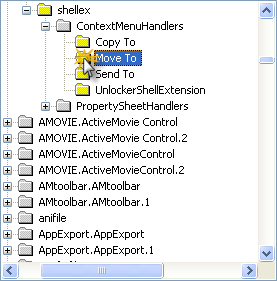
3– Click on Move To folder, in the right side Double-Click on (Default).
4– Give it this Value:
{C2FBB631-2971-11D1-A18C-00C04FD75D13}
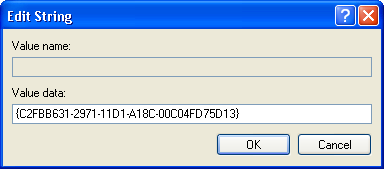
5– Click OK.
Congratulations! Copy to have been added to your computer.
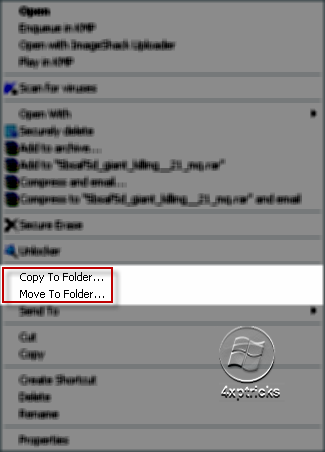
Close the Registry Editor, now right click on anything you want to move or copy it, you will notice the two options in the drop menu.
Any question? I'm here!
Subscribe to:
Posts (Atom)